 This website uses cookies. Learn more.
This website uses cookies. Learn more.
This website uses cookies. Learn more.
Hobby | Narrative Play | Crusade

You've asked politely for it. You've demanded it. You've written requests for it on small slips of paper that you slid under my front door and hired a skywriter to carve your feature requests into the clouds above my very head.
Message received, feature implemented, and here it is - you can now edit games!
But more than that, this is the first of our Game Management updates, bringing with it a host of improvements in viewing, editing, managing your games. Including the ability for campaign owners to edit games reported by members! Let's dive in, shall we.

Right away you'll see changes to the Games tab in your Order of Battle. Gone are the days of makeshift HTML tables, and instead you've now got a handy Game widget that shows more information about your games in rather nifty UI. Plus, I built it to be responsive, which is dev-speak for "it doesn't look like straight trash on mobile".
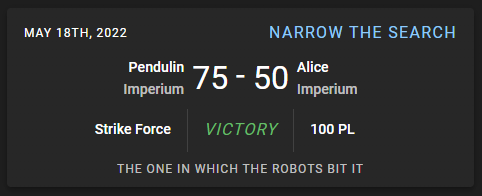
If you want to compare and contrast is with the old UI, it's still kicking around on the Games tabs in your Campaign and Units. And if you're a Patron, hop on our Discord server and give me your feedback about this design. There's plenty of time to make changes before rolling it out to Campaigns and Units.
But that's not all, this update also comes with lies! I lied about there being no more HTML tables, as you can swap over to a new and improved table view of your Roster's games at any time!

The new Game widgets and tables will be altered before they land on Campaigns and Unit pages. The Campaign one with more information about the player who recorded the game and their roster, and the Unit one with more information about how that particular unit performed in the game. And as mentioned earlier, if you have any feedback, we are always online in Discord. Always.
Clicking on the Game widget (or improved Game table) now sends you to the new Game View page. From here, you can view and edit your games! And if the game is part of a campaign, then the campaign owner can edit it as well!
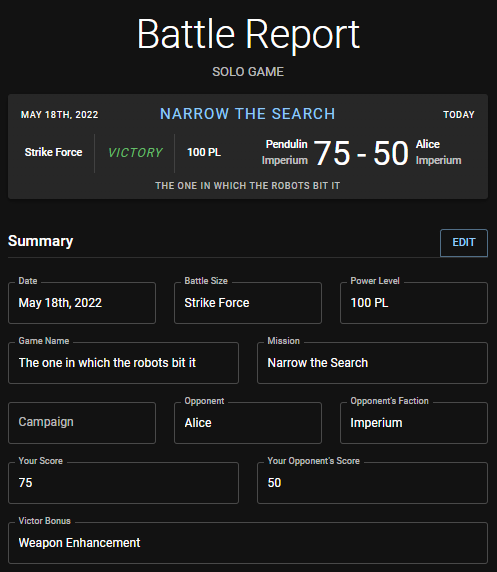
From this page you can see all the summary information of the game, as well as the breakdown for each participating unit. Relive those past moments of glory or learn from the pain of defeat.
Here's the heart of the update - editing games. To appreciate why this has been so long in the making, first realize that I broke up editing games into three separate workflows: score, campaign, and summary. Each of which has different impacts on the game and your Order of Battle. And let's dig into just one of them: altering the final score of a game.
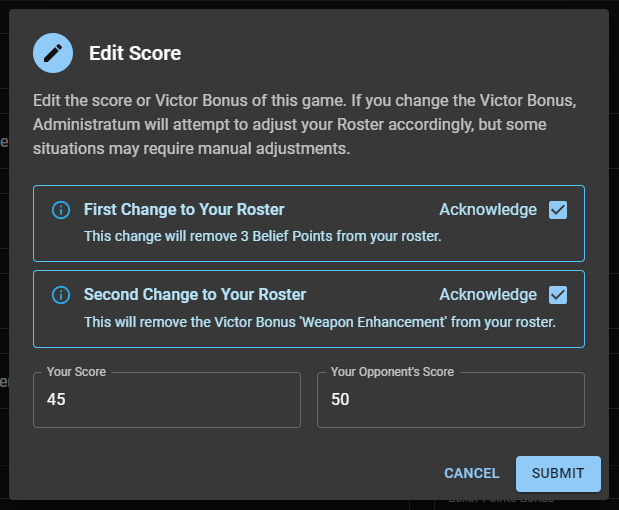
When you change a win to a loss, or vice versa, Administratum will automatically attempt to rewind any rewards your Order of Battle is no longer eligible for, as well as apply any newly earned rewards. In both cases, you'll get a notification about exactly what will happen to your roster. If you've already spent the reward, then Administratum will let you know that something is up and that you'll need to manually fix your roster.
That short description only covers a small fraction of stuff going on behind the curtain when you edit the final score of a game, but you get the point. Things be complicated, and Administratum is trying to make it less painful. And speaking of painful, who is ready for a giant brick of text - the patch notes!
That's all folks! Or at least that's all that I can remember plus what's indicated in our changelogs. Is there more that I just forgot? Probably. Who can keep track of everything they work on these days? Sometimes I'll start a feature and I don't even know where it's going. I just hope I find it along the way.
And if you want to read about my slow descent into coding madness, check out my dev blog for this update: Code Mines: Why is it Hard to Change the Past in Administratum?
Tags: 40k | Crusade | administratum

Thank you for being a friend.
 Games Industry News Roundup- April 7th, 2026
 Infinity N5 First Principles: Understanding the Outcomes of Face to Face Rolls
 A Brush With Greatness, Part 1: Introductions
Support us on Patreon to get access to our Discord and exclusive App features.
Thank you for being a friend.
Already a Patron? Login with Patreon.
Visit our incredibly official store on RedBubble.


Support us on Patreon to get access to our Discord and exclusive App features.
Thank you for being a friend.